Bulk upload
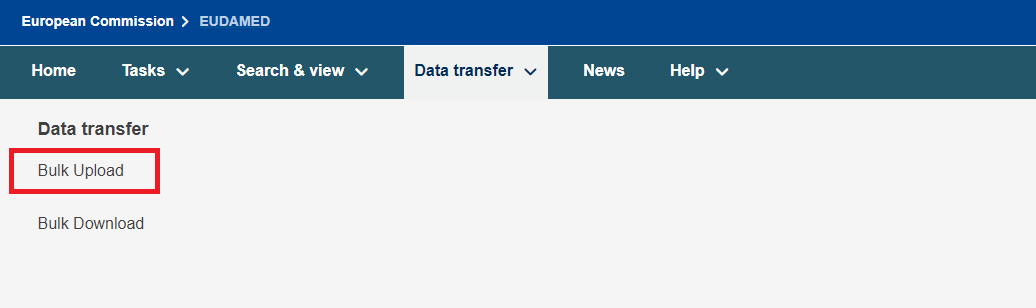
The file upload screen can be found for all users under Data transfer → Bulk Upload menu when you are logged in with the relevant profile:
Click on New upload to see the file upload screen:

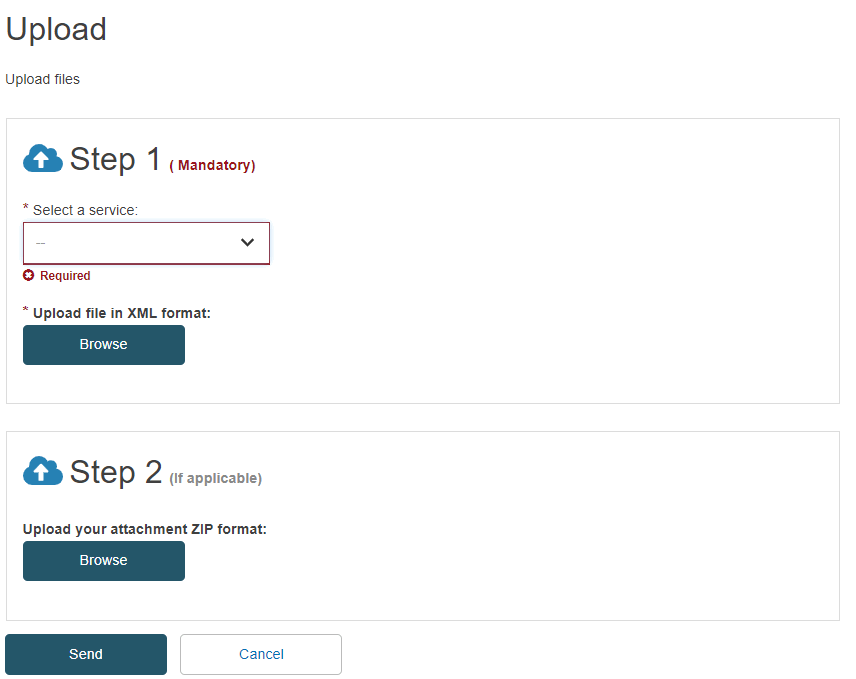
In this screen, you may select the desired service and attach an XML file for upload. Available services depend on which actor you are logged in as:
Note
There is a new service called Certificate upload to register new product certificates by providing a payload in XML format.
Important
Under Step 1: upload the XML request payload file.
Under Step 2: upload the related attachments (if applicable).
For some DTX services, various documents can/must be sent to EUDAMED. The files related to the report you would like to register via Bulk upload should be included in the ZIP folder and uploaded under Step 2.
If your request includes attachments as well, inside the XML request there are 2 tags:
FileName - provide the name of the file and the file extension;
FileURI - provide the path to the file starting with the main folder in your folder structure.
Note
Example 1:
ZIP folder has the following structure:

The XML request will contain the following information:

Example 2:
ZIP folder has the following structure:

The XML request will contain the following information:

Once uploaded, click on Go to upload management to see your pending upload. When the file has completed processing, you will see the XML response download link under the Response column:

If the XML payload request contains multiple objects (e.g. a DEVICE.POST with multiple devices or in case of the Playground environment, a VIG_DOSSIER.POST with multiple Vigilance dossiers), the DTX service will process each object individually and gather the response in one single file related to the initial request.
It is possible that one or multiple objects inside the request are correct and they are going to be processed, while one or multiple objects can be incorrect (duplicate values, incorrect data provided, etc.). Therefore, a single response may contain multiple lines of responses related to each object (some can be classified as SUCCESS and others as ERROR)
Possible statuses in BULK upload are:

To understand the result, download the XML response file from the Response column.
Only resubmit a new XML request for those objects that contain an error message inside the response.
Example: Of the ten DEVICE.POST devices, seven were processed successfully and three contained errors. As a result, seven devices were created in EUDAMED, while three were, as their creation requests were rejected. Please resubmit a new payload with the correct details for these three devices only.